Build controlled checkboxes and forbid selecting more than two. When the third is attempted, ignore the selection and show a gentle warning.

Business case. Clients assemble MVP packs: allow up to two features to keep focus on value.
What To Do
- Create state for selected options (array or set).
- Make checkboxes controlled:
checkedcomes from state, update inonChange. - Cap selection at two. The third attempt is blocked and shows a warning.
Final View
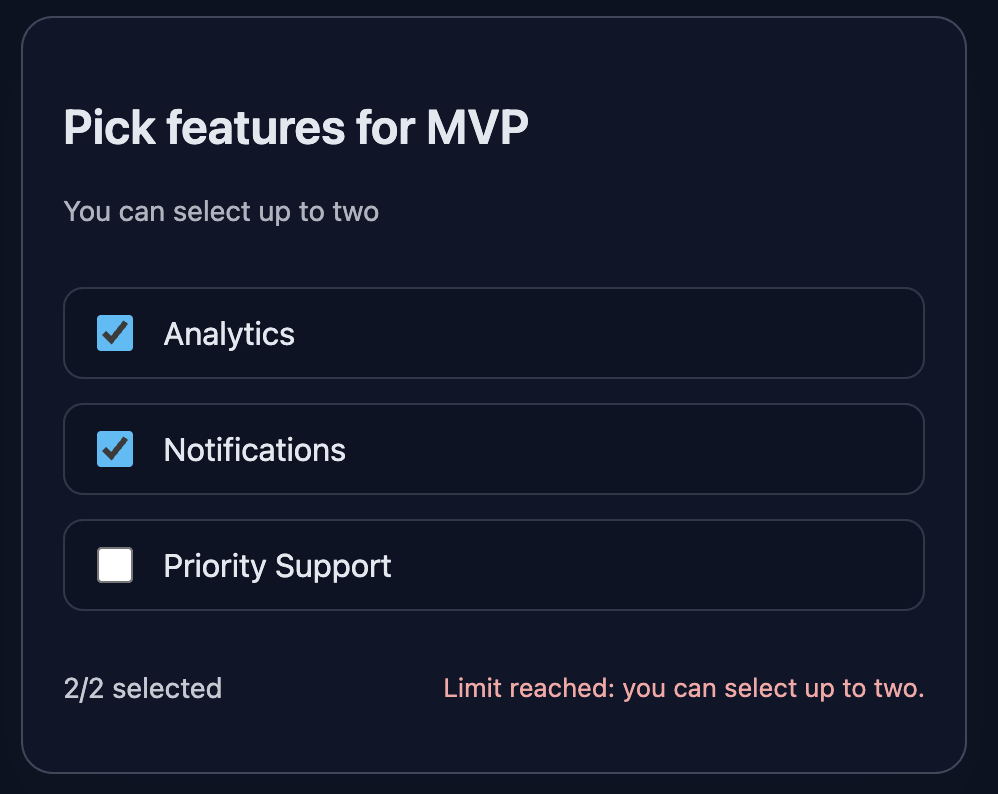
A card with three checkboxes, a N/2 selected counter, and a soft warning on limit exceeded.
Preview example:
💡 Hint
- Keep selected names in state:
const [selected, setSelected] = useState([]). - In the handler, enforce the limit: if two are already selected and user adds one more — do not change state, show a message.
- For UX, use a short
role="alert"message and optionallyaria-live. - React docs:
- State: https://react.dev/learn/state-a-components-memory
- Controlled inputs: https://react.dev/learn/forms
- Checkbox input: https://react.dev/reference/react-dom/components/input
👀 Solution
import React, { useState } from 'react';
import './styles.css';

export function FeatureSelector({ options = ['Analytics', 'Notifications', 'Priority Support'] }) {
  const [selected, setSelected] = useState([]);
  const [warning, setWarning] = useState('');

  function handleToggle(name) {
    const isChecked = selected.includes(name);

    if (isChecked) {
      setSelected(selected.filter((n) => n !== name));
      setWarning('');
      return;
    }

    if (selected.length >= 2) {
      setWarning('Limit reached: you can select up to two.');
      return;
    }

    setSelected([...selected, name]);
    setWarning('');
  }

  const count = selected.length;

  return (
    <article className="card" data-testid="feature-card">
      <header>
        <h2 className="title">Pick features for MVP</h2>
        <p className="subtitle">You can select up to two</p>
      </header>

      <div className="options">
        {options.map((name) => (
          <label key={name} className="option">
            <input
              className="checkbox"
              type="checkbox"
              checked={selected.includes(name)}
              onChange={() => handleToggle(name)}
            />
            <span>{name}</span>
          </label>
        ))}
      </div>

      <div className="counter-row">
        <p className="counter" aria-label="counter">{count}/2 selected</p>
        {warning && <p role="alert" className="warning">{warning}</p>}
      </div>
    </article>
  );
}

export default function App() {
  const features = ['Analytics', 'Notifications', 'Priority Support'];
  return (
    <main className="challenge-container">
      <section>
        <FeatureSelector options={features} />
      </section>
    </main>
  );
}React: Checkbox Limit Selection
Build controlled checkboxes and forbid selecting more than two. When the third is attempted, ignore the selection and show a gentle warning.
Business case. Clients assemble MVP packs: allow up to two features to keep focus on value.
What To Do
- Create state for selected options (array or set).
- Make checkboxes controlled:
checkedcomes from state, update inonChange. - Cap selection at two. The third attempt is blocked and shows a warning.
Final View
A card with three checkboxes, a N/2 selected counter, and a soft warning on limit exceeded.
Preview example:
💡 Hint
- Keep selected names in state:
const [selected, setSelected] = useState([]). - In the handler, enforce the limit: if two are already selected and user adds one more — do not change state, show a message.
- For UX, use a short
role="alert"message and optionallyaria-live. - React docs:
- State: https://react.dev/learn/state-a-components-memory
- Controlled inputs: https://react.dev/learn/forms
- Checkbox input: https://react.dev/reference/react-dom/components/input
👀 Solution
import React, { useState } from 'react';
import './styles.css';

export function FeatureSelector({ options = ['Analytics', 'Notifications', 'Priority Support'] }) {
  const [selected, setSelected] = useState([]);
  const [warning, setWarning] = useState('');

  function handleToggle(name) {
    const isChecked = selected.includes(name);

    if (isChecked) {
      setSelected(selected.filter((n) => n !== name));
      setWarning('');
      return;
    }

    if (selected.length >= 2) {
      setWarning('Limit reached: you can select up to two.');
      return;
    }

    setSelected([...selected, name]);
    setWarning('');
  }

  const count = selected.length;

  return (
    <article className="card" data-testid="feature-card">
      <header>
        <h2 className="title">Pick features for MVP</h2>
        <p className="subtitle">You can select up to two</p>
      </header>

      <div className="options">
        {options.map((name) => (
          <label key={name} className="option">
            <input
              className="checkbox"
              type="checkbox"
              checked={selected.includes(name)}
              onChange={() => handleToggle(name)}
            />
            <span>{name}</span>
          </label>
        ))}
      </div>

      <div className="counter-row">
        <p className="counter" aria-label="counter">{count}/2 selected</p>
        {warning && <p role="alert" className="warning">{warning}</p>}
      </div>
    </article>
  );
}

export default function App() {
  const features = ['Analytics', 'Notifications', 'Priority Support'];
  return (
    <main className="challenge-container">
      <section>
        <FeatureSelector options={features} />
      </section>
    </main>
  );
}🧑💻 It's not a bug! It's a feature!
The code editor is intentionally hidden on mobile.
Believe me, it's for the best: I am protecting you from the temptation to code in less-than-ideal conditions. A small screen and a virtual keyboard are not the best tools for a programmer.
📖 Now: Study the task, think through the solution. Act like a strategist.
💻 Later: Sit down at your computer, open the site, and implement all your ideas comfortably. Act like a code-jedi!