Build a composite
ProductCardfrom three small components:Title,Price, andBuyButton. Stateless — props only.

Composition is foundational in React. Small parts are easy to test and reuse; assemble them into larger ones.
What To Do
- Create tiny components:
Title,Price,BuyButton. - Compose them inside
ProductCard. - Pass the buy handler via props to the button.
Final View
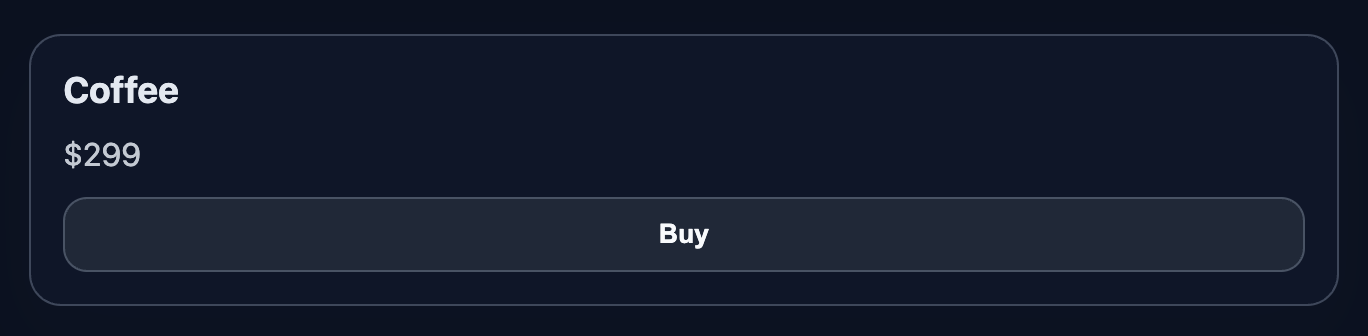
Show a product card with title, price, and a button.
// … existing code …
Final result should look like this:
 // … existing code …
💡 Hint
- Composition is just JSX:
<article className="product-card">
  <Title>{title}</Title>
  <Price value={price} currency={currency} />
  <BuyButton onClick={onBuy} />
</article>
👀 Solution
import React from 'react';
import './styles.css';

export function Title({ children }) {
  return <h3 className="product-title">{children}</h3>;
}
export function Price({ value, currency = '$' }) {
  return <p className="product-price">{currency}{value}</p>;
}
export function BuyButton({ label = 'Buy', onClick }) {
  return <button className="action-button" onClick={onClick}>{label}</button>;
}

export function ProductCard({ title, price, currency = '$', onBuy }) {
  return (
    <article className="product-card">
      <Title>{title}</Title>
      <Price value={price} currency={currency} />
      <BuyButton onClick={onBuy} />
    </article>
  );
}

export default function App() {
  function handleBuy(product) {
    alert(`Buying: ${product}`);
  }
  const product = { title: 'Coffee', price: 299 };

  return (
    <main className="challenge-container">
      <section>
        <ProductCard
          title={product.title}
          price={product.price}
          currency="$"
          onBuy={() => handleBuy(product.title)}
        />
      </section>
    </main>
  );
}Почему это работает / Why this works: Мелкие компоненты изолируют ответственность и повышают переиспользуемость, а составной компонент их агрегирует. Это упрощает тестирование и поддержку.
Примечание: добавь изображения teamlead.jpg, result.png, resulten.png в public/images/challenge/8/, чтобы блоки с картинками корректно отображались.
React: Compose Small Components into One
Build a composite
ProductCardfrom three small components:Title,Price, andBuyButton. Stateless — props only.
Composition is foundational in React. Small parts are easy to test and reuse; assemble them into larger ones.
What To Do
- Create tiny components:
Title,Price,BuyButton. - Compose them inside
ProductCard. - Pass the buy handler via props to the button.
Final View
Show a product card with title, price, and a button.
// … existing code …
Final result should look like this:
// … existing code …
💡 Hint
- Composition is just JSX:
<article className="product-card">
  <Title>{title}</Title>
  <Price value={price} currency={currency} />
  <BuyButton onClick={onBuy} />
</article>
👀 Solution
import React from 'react';
import './styles.css';

export function Title({ children }) {
  return <h3 className="product-title">{children}</h3>;
}
export function Price({ value, currency = '$' }) {
  return <p className="product-price">{currency}{value}</p>;
}
export function BuyButton({ label = 'Buy', onClick }) {
  return <button className="action-button" onClick={onClick}>{label}</button>;
}

export function ProductCard({ title, price, currency = '$', onBuy }) {
  return (
    <article className="product-card">
      <Title>{title}</Title>
      <Price value={price} currency={currency} />
      <BuyButton onClick={onBuy} />
    </article>
  );
}

export default function App() {
  function handleBuy(product) {
    alert(`Buying: ${product}`);
  }
  const product = { title: 'Coffee', price: 299 };

  return (
    <main className="challenge-container">
      <section>
        <ProductCard
          title={product.title}
          price={product.price}
          currency="$"
          onBuy={() => handleBuy(product.title)}
        />
      </section>
    </main>
  );
}
Почему это работает / Why this works: Мелкие компоненты изолируют ответственность и повышают переиспользуемость, а составной компонент их агрегирует. Это упрощает тестирование и поддержку.
Примечание: добавь изображения teamlead.jpg, result.png, resulten.png в public/images/challenge/8/, чтобы блоки с картинками корректно отображались.
🧑💻 It's not a bug! It's a feature!
The code editor is intentionally hidden on mobile.
Believe me, it's for the best: I am protecting you from the temptation to code in less-than-ideal conditions. A small screen and a virtual keyboard are not the best tools for a programmer.
📖 Now: Study the task, think through the solution. Act like a strategist.
💻 Later: Sit down at your computer, open the site, and implement all your ideas comfortably. Act like a code-jedi!