Build a controlled input, store its value in state, and display the character count. The counter must not exceed 32.

Controlled inputs. Manage value via state and show accurate length.
What To Do
- Create state for the input value.
- Make the input controlled: value comes from state, update on
onChange. - Display the string length below the input, capped at 32.
Final View
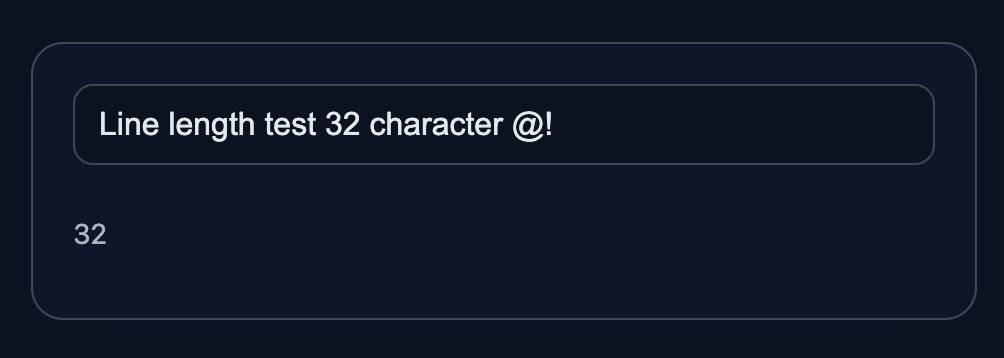
A card with an input and a character counter (limit 32).
Final result should look like this:
💡 Hint
- Store the input value in state and update on
onChange. - Limit the input field to 32 characters:
maxLength={32}. - Display the entered string length below the input:
value.length. - React docs:
- Reacting to input with state: https://react.dev/learn/reacting-to-input-with-state
inputDOM component: https://react.dev/reference/react-dom/components/input- Forms: https://react.dev/learn/forms
👀 Solution
import React, { useState } from 'react';
import './styles.css';

export function TextInputCounter({ placeholder = 'Enter text...' }) {
  const [value, setValue] = useState('');

  function handleChange(e) {
    setValue(e.target.value);
  }

  return (
    <article className="input-card" data-testid="input-card">
      <input
        className="text-input"
        type="text"
        placeholder={placeholder}
        value={value}
        onChange={handleChange}
        maxLength={32}
      />
      <p className="counter" aria-label="counter">{value.length}</p>
    </article>
  );
}

export default function App() {
  return (
    <main className="challenge-container">
      <section>
        <TextInputCounter />
      </section>
    </main>
  );
}React: Input and Character Counter
Build a controlled input, store its value in state, and display the character count. The counter must not exceed 32.
Controlled inputs. Manage value via state and show accurate length.
What To Do
- Create state for the input value.
- Make the input controlled: value comes from state, update on
onChange. - Display the string length below the input, capped at 32.
Final View
A card with an input and a character counter (limit 32).
Final result should look like this:
💡 Hint
- Store the input value in state and update on
onChange. - Limit the input field to 32 characters:
maxLength={32}. - Display the entered string length below the input:
value.length. - React docs:
- Reacting to input with state: https://react.dev/learn/reacting-to-input-with-state
inputDOM component: https://react.dev/reference/react-dom/components/input- Forms: https://react.dev/learn/forms
👀 Solution
import React, { useState } from 'react';
import './styles.css';

export function TextInputCounter({ placeholder = 'Enter text...' }) {
  const [value, setValue] = useState('');

  function handleChange(e) {
    setValue(e.target.value);
  }

  return (
    <article className="input-card" data-testid="input-card">
      <input
        className="text-input"
        type="text"
        placeholder={placeholder}
        value={value}
        onChange={handleChange}
        maxLength={32}
      />
      <p className="counter" aria-label="counter">{value.length}</p>
    </article>
  );
}

export default function App() {
  return (
    <main className="challenge-container">
      <section>
        <TextInputCounter />
      </section>
    </main>
  );
}🧑💻 It's not a bug! It's a feature!
The code editor is intentionally hidden on mobile.
Believe me, it's for the best: I am protecting you from the temptation to code in less-than-ideal conditions. A small screen and a virtual keyboard are not the best tools for a programmer.
📖 Now: Study the task, think through the solution. Act like a strategist.
💻 Later: Sit down at your computer, open the site, and implement all your ideas comfortably. Act like a code-jedi!