Render a list of product cards from the
productsarray usingArray.map. Keep it stateless — props only, no local state.

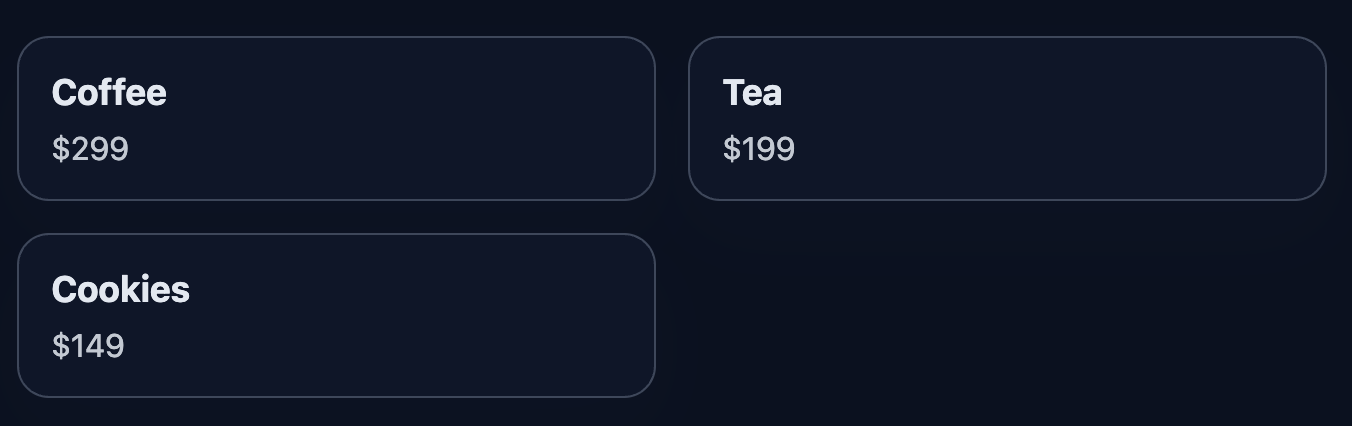
List rendering is fundamental. Transform a products array into a grid of cards. Each card shows title and price.
What To Do
- Create
ProductCardwithtitleandpriceprops. - In
App, render theproductsarray viamap. - Use
key={product.id}for list items. - Markup:
<article class="product-card"><h3 class="product-title"><p class="product-price">
Final View
Render all products in a grid. Each card contains title and price.
Final result should look like this:
💡 Hint
- Transform array:
products.map(p => <ProductCard key={p.id} title={p.title} price={p.price} />). - Keys are required for stable list rendering.
- Docs: react.dev/learn/rendering-lists
👀 Solution
import React from 'react';
import './styles.css';

export function ProductCard({ title, price }) {
  return (
    <article className="product-card">
      <h3 className="product-title">{title}</h3>
      <p className="product-price">${price}</p>
    </article>
  );
}

export default function App() {
  const products = [
    { id: 1, title: 'Coffee', price: 299 },
    { id: 2, title: 'Tea', price: 199 },
    { id: 3, title: 'Cookies', price: 149 },
  ];
  return (
    <main className="challenge-container">
      <section>
        <div className="product-grid">
          {products.map((p) => (
            <ProductCard key={p.id} title={p.title} price={p.price} />
          ))}
        </div>
      </section>
    </main>
  );
}Why this works: map converts data into JSX elements. Keys help React update lists efficiently.
React: Product Cards via map
Render a list of product cards from the
productsarray usingArray.map. Keep it stateless — props only, no local state.
List rendering is fundamental. Transform a products array into a grid of cards. Each card shows title and price.
What To Do
- Create
ProductCardwithtitleandpriceprops. - In
App, render theproductsarray viamap. - Use
key={product.id}for list items. - Markup:
<article class="product-card"><h3 class="product-title"><p class="product-price">
Final View
Render all products in a grid. Each card contains title and price.
Final result should look like this:
💡 Hint
- Transform array:
products.map(p => <ProductCard key={p.id} title={p.title} price={p.price} />). - Keys are required for stable list rendering.
- Docs: react.dev/learn/rendering-lists
👀 Solution
import React from 'react';
import './styles.css';

export function ProductCard({ title, price }) {
  return (
    <article className="product-card">
      <h3 className="product-title">{title}</h3>
      <p className="product-price">${price}</p>
    </article>
  );
}

export default function App() {
  const products = [
    { id: 1, title: 'Coffee', price: 299 },
    { id: 2, title: 'Tea', price: 199 },
    { id: 3, title: 'Cookies', price: 149 },
  ];
  return (
    <main className="challenge-container">
      <section>
        <div className="product-grid">
          {products.map((p) => (
            <ProductCard key={p.id} title={p.title} price={p.price} />
          ))}
        </div>
      </section>
    </main>
  );
}
Why this works: map converts data into JSX elements. Keys help React update lists efficiently.
🧑💻 It's not a bug! It's a feature!
The code editor is intentionally hidden on mobile.
Believe me, it's for the best: I am protecting you from the temptation to code in less-than-ideal conditions. A small screen and a virtual keyboard are not the best tools for a programmer.
📖 Now: Study the task, think through the solution. Act like a strategist.
💻 Later: Sit down at your computer, open the site, and implement all your ideas comfortably. Act like a code-jedi!