Build a controlled input (0–100) that fills a progress bar accordingly. Clamp out-of-range values.

Business case. LoadMeter — team load indicator: type percent, see progress.
What To Do
- Make the input controlled and update state on
onChange. - Clamp the value between 0 and 100.
- Update the bar width and show percent text.
Final View
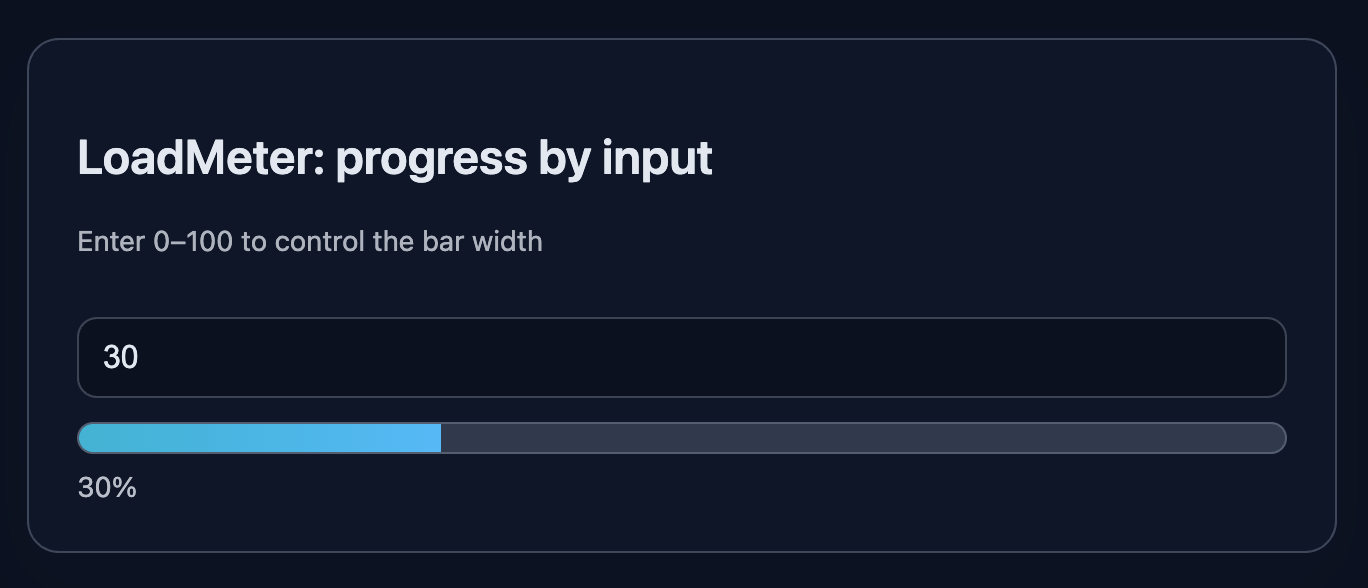
A card with number input, progress bar and percent text.
Preview:
💡 Hint
- State:
const [value, setValue] = useState(0). - In handler:
let n = parseInt(e.target.value, 10) || 0; n = Math.min(100, Math.max(0, n)); setValue(n);. - Fill style:
style={{ width: value + '%' }}. - Use
type="number"withmin/max.
👀 Solution
import React, { useState } from 'react';
import './styles.css';

export function ProgressInput() {
  const [value, setValue] = useState(0);

  function handleChange(e) {
    const raw = e.target.value;
    if (raw === '') {
      setValue(0);
      return;
    }
    let n = parseInt(raw, 10);
    if (isNaN(n)) n = 0;
    n = Math.max(0, Math.min(100, n));
    setValue(n);
  }

  const fillStyle = { width: value + '%' };

  return (
    <article className="card" data-testid="progress-card">
      <header>
        <h2 className="title">LoadMeter: progress by input</h2>
        <p className="subtitle">Enter 0–100 to control the bar width</p>
      </header>

      <div className="row">
        <input
          className="input"
          type="number"
          min={0}
          max={100}
          placeholder="Enter a number from 0 to 100"
          value={value}
          onChange={handleChange}
          aria-label="value"
        />

        <div className="progress">
          <div className="progress-track" aria-label="progress-track">
            <div className="progress-fill" style={fillStyle} aria-label="progress-fill" />
          </div>
          <span className="percent" aria-label="percent">{value}%</span>
        </div>
      </div>
    </article>
  );
}

export default function App() {
  return (
    <main className="challenge-container">
      <section>
        <ProgressInput />
      </section>
    </main>
  );
}React: Progress Bar from Input
Build a controlled input (0–100) that fills a progress bar accordingly. Clamp out-of-range values.
Business case. LoadMeter — team load indicator: type percent, see progress.
What To Do
- Make the input controlled and update state on
onChange. - Clamp the value between 0 and 100.
- Update the bar width and show percent text.
Final View
A card with number input, progress bar and percent text.
Preview:
💡 Hint
- State:
const [value, setValue] = useState(0). - In handler:
let n = parseInt(e.target.value, 10) || 0; n = Math.min(100, Math.max(0, n)); setValue(n);. - Fill style:
style={{ width: value + '%' }}. - Use
type="number"withmin/max.
👀 Solution
import React, { useState } from 'react';
import './styles.css';

export function ProgressInput() {
  const [value, setValue] = useState(0);

  function handleChange(e) {
    const raw = e.target.value;
    if (raw === '') {
      setValue(0);
      return;
    }
    let n = parseInt(raw, 10);
    if (isNaN(n)) n = 0;
    n = Math.max(0, Math.min(100, n));
    setValue(n);
  }

  const fillStyle = { width: value + '%' };

  return (
    <article className="card" data-testid="progress-card">
      <header>
        <h2 className="title">LoadMeter: progress by input</h2>
        <p className="subtitle">Enter 0–100 to control the bar width</p>
      </header>

      <div className="row">
        <input
          className="input"
          type="number"
          min={0}
          max={100}
          placeholder="Enter a number from 0 to 100"
          value={value}
          onChange={handleChange}
          aria-label="value"
        />

        <div className="progress">
          <div className="progress-track" aria-label="progress-track">
            <div className="progress-fill" style={fillStyle} aria-label="progress-fill" />
          </div>
          <span className="percent" aria-label="percent">{value}%</span>
        </div>
      </div>
    </article>
  );
}

export default function App() {
  return (
    <main className="challenge-container">
      <section>
        <ProgressInput />
      </section>
    </main>
  );
}🧑💻 It's not a bug! It's a feature!
The code editor is intentionally hidden on mobile.
Believe me, it's for the best: I am protecting you from the temptation to code in less-than-ideal conditions. A small screen and a virtual keyboard are not the best tools for a programmer.
📖 Now: Study the task, think through the solution. Act like a strategist.
💻 Later: Sit down at your computer, open the site, and implement all your ideas comfortably. Act like a code-jedi!