Implement a stopwatch with start, stop, and reset buttons. Display time in
mm:ss.Implement using only the
useStatehook. Other hooks (e.g.useEffect,useRef) are not allowed.

Product focus. Accurate time is the backbone of productivity analytics. Practice start/stop, reset, and resource cleanup.
What To Do
- Use only
useState; do not use other hooks (useEffect,useRef, etc.). - Create
isRunningandelapsed(seconds) states. - Start: run a
setIntervalthat incrementselapsedevery second. - Stop: clear the interval and set
isRunning = false. - Reset: clear interval, set
elapsed = 0,isRunning = false. - Format time as
mm:ss.
Final View
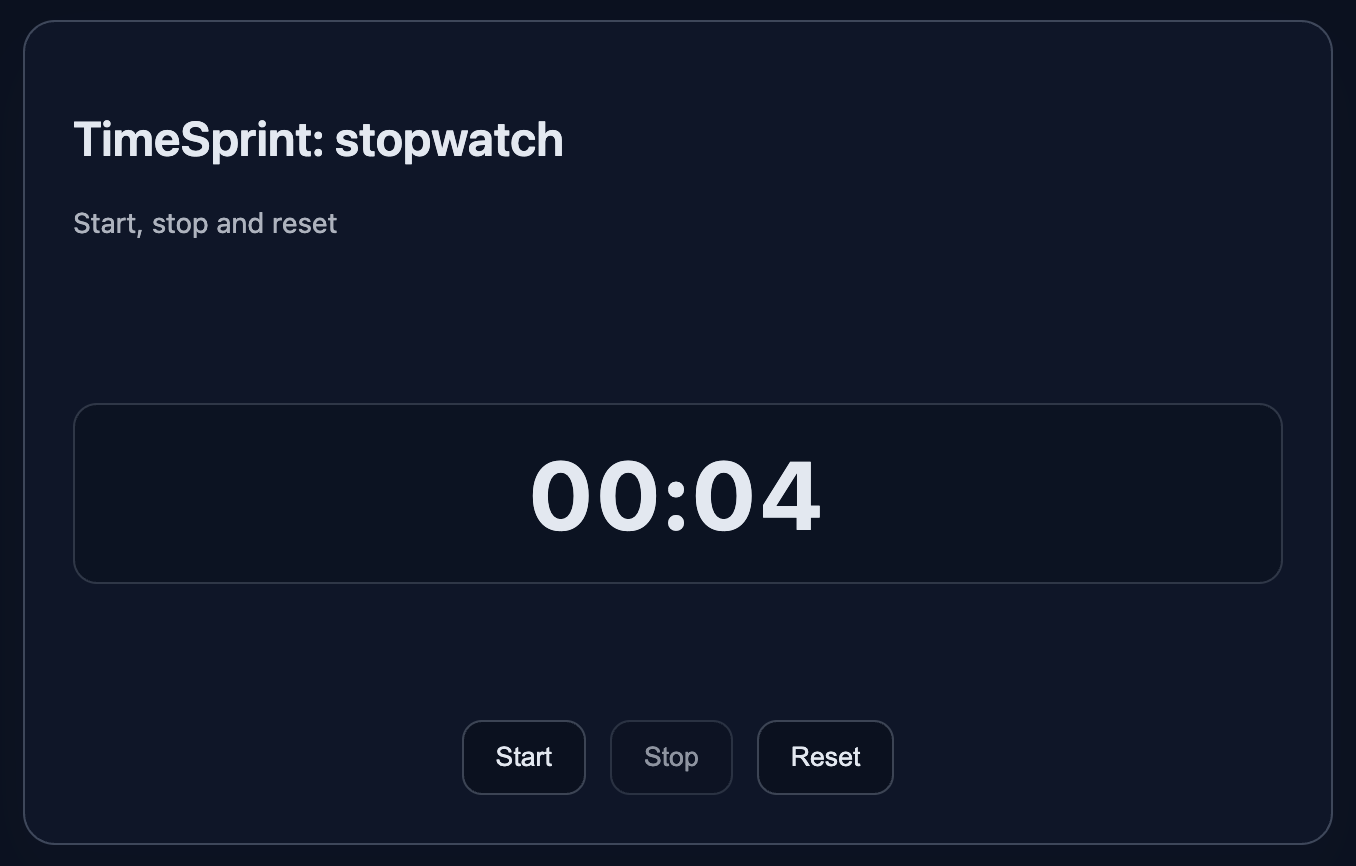
A card showing the time and three buttons: Start, Stop, Reset.
Preview:
💡 Hint
- Use state only:
isRunning,elapsed, andtimerId. - Start interval in
handleStart:const id = setInterval(() => setElapsed(prev => prev + 1), 1000)and storeidin state. - Stop via
clearInterval(timerId)and resettimerIdtonull. - Reset should stop the interval, set
elapsed = 0,isRunning = false. - Disable the Start button while running to avoid multiple intervals.
👀 Solution
import React, { useState } from 'react';
import './styles.css';

export function Stopwatch() {
  const [isRunning, setIsRunning] = useState(false);
  const [elapsed, setElapsed] = useState(0);
  const [timerId, setTimerId] = useState(null);

  function handleStart() {
    if (isRunning) return;
    const id = setInterval(() => {
      setElapsed((prev) => prev + 1);
    }, 1000);
    setTimerId(id);
    setIsRunning(true);
  }

  function handleStop() {
    if (timerId) {
      clearInterval(timerId);
      setTimerId(null);
    }
    setIsRunning(false);
  }

  function handleReset() {
    if (timerId) {
      clearInterval(timerId);
      setTimerId(null);
    }
    setIsRunning(false);
    setElapsed(0);
  }

  function format(seconds) {
    const m = Math.floor(seconds / 60);
    const s = seconds % 60;
    return String(m).padStart(2, '0') + ':' + String(s).padStart(2, '0');
  }

  return (
    <article className="card" data-testid="stopwatch-card">
      <header>
        <h2 className="title">TimeSprint: stopwatch</h2>
        <p className="subtitle">Start, stop and reset</p>
      </header>

      <p className="display" aria-label="time">{format(elapsed)}</p>

      <div className="row">
        <button className="button" onClick={handleStart} disabled={isRunning}>Start</button>
        <button className="button" onClick={handleStop} disabled={!isRunning}>Stop</button>
        <button className="button" onClick={handleReset}>Reset</button>
      </div>
    </article>
  );
}

export default function App() {
  return (
    <main className="challenge-container">
      <section>
        <Stopwatch />
      </section>
    </main>
  );
}React: Stopwatch / Timer — start, stop, reset
Implement a stopwatch with start, stop, and reset buttons. Display time in
mm:ss.Implement using only the
useStatehook. Other hooks (e.g.useEffect,useRef) are not allowed.
Product focus. Accurate time is the backbone of productivity analytics. Practice start/stop, reset, and resource cleanup.
What To Do
- Use only
useState; do not use other hooks (useEffect,useRef, etc.). - Create
isRunningandelapsed(seconds) states. - Start: run a
setIntervalthat incrementselapsedevery second. - Stop: clear the interval and set
isRunning = false. - Reset: clear interval, set
elapsed = 0,isRunning = false. - Format time as
mm:ss.
Final View
A card showing the time and three buttons: Start, Stop, Reset.
Preview:
💡 Hint
- Use state only:
isRunning,elapsed, andtimerId. - Start interval in
handleStart:const id = setInterval(() => setElapsed(prev => prev + 1), 1000)and storeidin state. - Stop via
clearInterval(timerId)and resettimerIdtonull. - Reset should stop the interval, set
elapsed = 0,isRunning = false. - Disable the Start button while running to avoid multiple intervals.
👀 Solution
import React, { useState } from 'react';
import './styles.css';

export function Stopwatch() {
  const [isRunning, setIsRunning] = useState(false);
  const [elapsed, setElapsed] = useState(0);
  const [timerId, setTimerId] = useState(null);

  function handleStart() {
    if (isRunning) return;
    const id = setInterval(() => {
      setElapsed((prev) => prev + 1);
    }, 1000);
    setTimerId(id);
    setIsRunning(true);
  }

  function handleStop() {
    if (timerId) {
      clearInterval(timerId);
      setTimerId(null);
    }
    setIsRunning(false);
  }

  function handleReset() {
    if (timerId) {
      clearInterval(timerId);
      setTimerId(null);
    }
    setIsRunning(false);
    setElapsed(0);
  }

  function format(seconds) {
    const m = Math.floor(seconds / 60);
    const s = seconds % 60;
    return String(m).padStart(2, '0') + ':' + String(s).padStart(2, '0');
  }

  return (
    <article className="card" data-testid="stopwatch-card">
      <header>
        <h2 className="title">TimeSprint: stopwatch</h2>
        <p className="subtitle">Start, stop and reset</p>
      </header>

      <p className="display" aria-label="time">{format(elapsed)}</p>

      <div className="row">
        <button className="button" onClick={handleStart} disabled={isRunning}>Start</button>
        <button className="button" onClick={handleStop} disabled={!isRunning}>Stop</button>
        <button className="button" onClick={handleReset}>Reset</button>
      </div>
    </article>
  );
}

export default function App() {
  return (
    <main className="challenge-container">
      <section>
        <Stopwatch />
      </section>
    </main>
  );
}🧑💻 It's not a bug! It's a feature!
The code editor is intentionally hidden on mobile.
Believe me, it's for the best: I am protecting you from the temptation to code in less-than-ideal conditions. A small screen and a virtual keyboard are not the best tools for a programmer.
📖 Now: Study the task, think through the solution. Act like a strategist.
💻 Later: Sit down at your computer, open the site, and implement all your ideas comfortably. Act like a code-jedi!