First day: make the
UserCardcomponent accept name and email through props and display them inside the card.

Welcome to the team! Alex has finally set up all your access and is immediately giving you your first task. Our CRM already stores colleague data, now we need to render it in the interface. Your component will be seen by the entire team, so make the card look presentable.
What needs to be done
- Add
nameandemailprops toUserCard, display them in the heading and caption. - In
App, callUserCardfour times, passing data for Alexander Ermolov, Marina Morozova, Ilya Lebedev, and Ksenia Volkova. - Leave neat defaults
'User Name'andemail@example.comin case the data doesn’t arrive. - Don’t use
mapor other loops when rendering — just pass the necessary values manually.
Card data
[
  { name: 'Alexander Ermolov', email: 'alex@easyadvice.dev' },
  { name: 'Marina Morozova', email: 'marina@easyadvice.dev' },
  { name: 'Ilya Lebedev', email: 'ilya@easyadvice.dev' },
  { name: 'Ksenia Volkova', email: 'kseniia@easyadvice.dev' }
]Use this data and display each card on a separate UserCard.
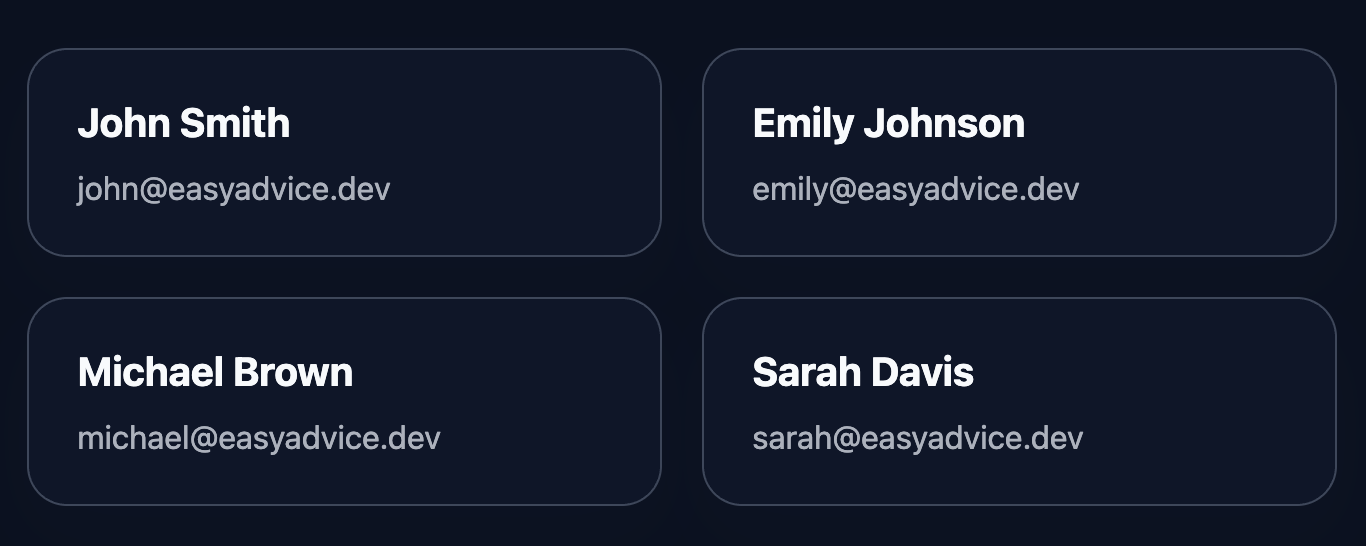
The final result should look like this:
💡 Hint
- Props in a functional component can be destructured:
function UserCard({ name, email }) { ... }. - Pass values when calling:
<UserCard name={member.name} email={member.email} />. - You can take values from the
teammatesarray by index:teammates[0],teammates[1], etc. The main thing is not to usemap, but to pass props manually. - For defaults, set default values directly in the signature:
{ name = 'User Name', email = 'email@example.com' }. - Documentation: react.dev/learn/passing-props-to-a-component
👀 Solution
import React from 'react';
import './styles.css';

const teammates = [
  { id: 1, name: 'John Smith', email: 'john@easyadvice.dev' },
  { id: 2, name: 'Emily Johnson', email: 'emily@easyadvice.dev' },
  { id: 3, name: 'Michael Brown', email: 'michael@easyadvice.dev' },
  { id: 4, name: 'Sarah Davis', email: 'sarah@easyadvice.dev' },
];

export function UserCard({
  name = 'User Name',
  email = 'email@example.com',
}) {
  return (
    <article className="user-card" data-testid="user-card">
      <h2 className="user-card__name">{name}</h2>
      <p className="user-card__email">{email}</p>
    </article>
  );
}

export default function App() {
  return (
    <main className="challenge-container">
      <section className="challenge-cards">
        <UserCard name={teammates[0].name} email={teammates[0].email} />
        <UserCard name={teammates[1].name} email={teammates[1].email} />
        <UserCard name={teammates[2].name} email={teammates[2].email} />
        <UserCard name={teammates[3].name} email={teammates[3].email} />
      </section>
    </main>
  );
}Why this works: UserCard accepts name and email through props, making it easy to reuse. We put the data in the teammates array, but pass them manually to each <UserCard />, which meets the task requirements without using map. Defaults remain in case the data doesn’t arrive.
React: User Card
First day: make the
UserCardcomponent accept name and email through props and display them inside the card.
Welcome to the team! Alex has finally set up all your access and is immediately giving you your first task. Our CRM already stores colleague data, now we need to render it in the interface. Your component will be seen by the entire team, so make the card look presentable.
What needs to be done
- Add
nameandemailprops toUserCard, display them in the heading and caption. - In
App, callUserCardfour times, passing data for Alexander Ermolov, Marina Morozova, Ilya Lebedev, and Ksenia Volkova. - Leave neat defaults
'User Name'andemail@example.comin case the data doesn’t arrive. - Don’t use
mapor other loops when rendering — just pass the necessary values manually.
Card data
[
  { name: 'Alexander Ermolov', email: 'alex@easyadvice.dev' },
  { name: 'Marina Morozova', email: 'marina@easyadvice.dev' },
  { name: 'Ilya Lebedev', email: 'ilya@easyadvice.dev' },
  { name: 'Ksenia Volkova', email: 'kseniia@easyadvice.dev' }
]
Use this data and display each card on a separate UserCard.
The final result should look like this:
💡 Hint
- Props in a functional component can be destructured:
function UserCard({ name, email }) { ... }. - Pass values when calling:
<UserCard name={member.name} email={member.email} />. - You can take values from the
teammatesarray by index:teammates[0],teammates[1], etc. The main thing is not to usemap, but to pass props manually. - For defaults, set default values directly in the signature:
{ name = 'User Name', email = 'email@example.com' }. - Documentation: react.dev/learn/passing-props-to-a-component
👀 Solution
import React from 'react';
import './styles.css';

const teammates = [
  { id: 1, name: 'John Smith', email: 'john@easyadvice.dev' },
  { id: 2, name: 'Emily Johnson', email: 'emily@easyadvice.dev' },
  { id: 3, name: 'Michael Brown', email: 'michael@easyadvice.dev' },
  { id: 4, name: 'Sarah Davis', email: 'sarah@easyadvice.dev' },
];

export function UserCard({
  name = 'User Name',
  email = 'email@example.com',
}) {
  return (
    <article className="user-card" data-testid="user-card">
      <h2 className="user-card__name">{name}</h2>
      <p className="user-card__email">{email}</p>
    </article>
  );
}

export default function App() {
  return (
    <main className="challenge-container">
      <section className="challenge-cards">
        <UserCard name={teammates[0].name} email={teammates[0].email} />
        <UserCard name={teammates[1].name} email={teammates[1].email} />
        <UserCard name={teammates[2].name} email={teammates[2].email} />
        <UserCard name={teammates[3].name} email={teammates[3].email} />
      </section>
    </main>
  );
}
Why this works: UserCard accepts name and email through props, making it easy to reuse. We put the data in the teammates array, but pass them manually to each <UserCard />, which meets the task requirements without using map. Defaults remain in case the data doesn’t arrive.
🧑💻 It's not a bug! It's a feature!
The code editor is intentionally hidden on mobile.
Believe me, it's for the best: I am protecting you from the temptation to code in less-than-ideal conditions. A small screen and a virtual keyboard are not the best tools for a programmer.
📖 Now: Study the task, think through the solution. Act like a strategist.
💻 Later: Sit down at your computer, open the site, and implement all your ideas comfortably. Act like a code-jedi!